News about our latest features and enhancements, newest first, and how to put them to work.
New
Bulk AI Suggestions: fix 20 products at once
A shallow product category and empty category metafields are the two gaps that most often stop an AI shopping agent recommending a product. Until now you closed them one product at a time. Now you select up to 20 products in My Store, press once and carry on working.
The run happens in the background. Progress lives in the alerts drawer, so you can leave the page, and runs stack if you want to queue another. When it finishes, every waiting product sits in one review table: the category it has today, the category AgentIQ suggests, and one line per category metafield with the values Shopify actually accepts for that field. No free text, so nothing you approve can bounce later.
You decide field by field. Accept a value, leave it pending for later or clear it. A row is Approved, Pending or Not ready, never two at once, so one press can never write half a product and store the other half.
Nothing reaches Shopify until you press Save. Approved rows are written and leave the table. Pending ones stay attached to the product, read Review pending in My Store and come back in the next run, so a decision you postponed is never lost.
New
AgentIQ now works inside Sidekick
AgentIQ is now available directly inside Sidekick, Shopify’s built-in AI assistant. Merchants can ask Sidekick to search the Knowledge Center, run playbooks, check product status and APLs, and now create or edit store FAQs.
FAQ creation is the first AgentIQ action Sidekick can actually perform, not just look up. Sidekick drafts the FAQ and shows the merchant a confirmation form before anything is saved, so nothing goes live without their approval.
Improved
Prompt Library, now ranked by Volume and Opportunity Score
Grounding your test prompts in real shopper language beats internal guesses every time. Every prompt in your Prompt Library now carries a Volume estimate and an Opportunity Score, so you know exactly which ones are worth optimizing for first.
AMS (Agentic Management System) is a platform that generates a personalized, real-time storefront tailored to each individual shopper’s (or AI agent’s) intent, rather than serving a static, one-size-fits-all page.
Features tell you what a button does. Playbooks tell you which buttons to press, in which order, to get a result.
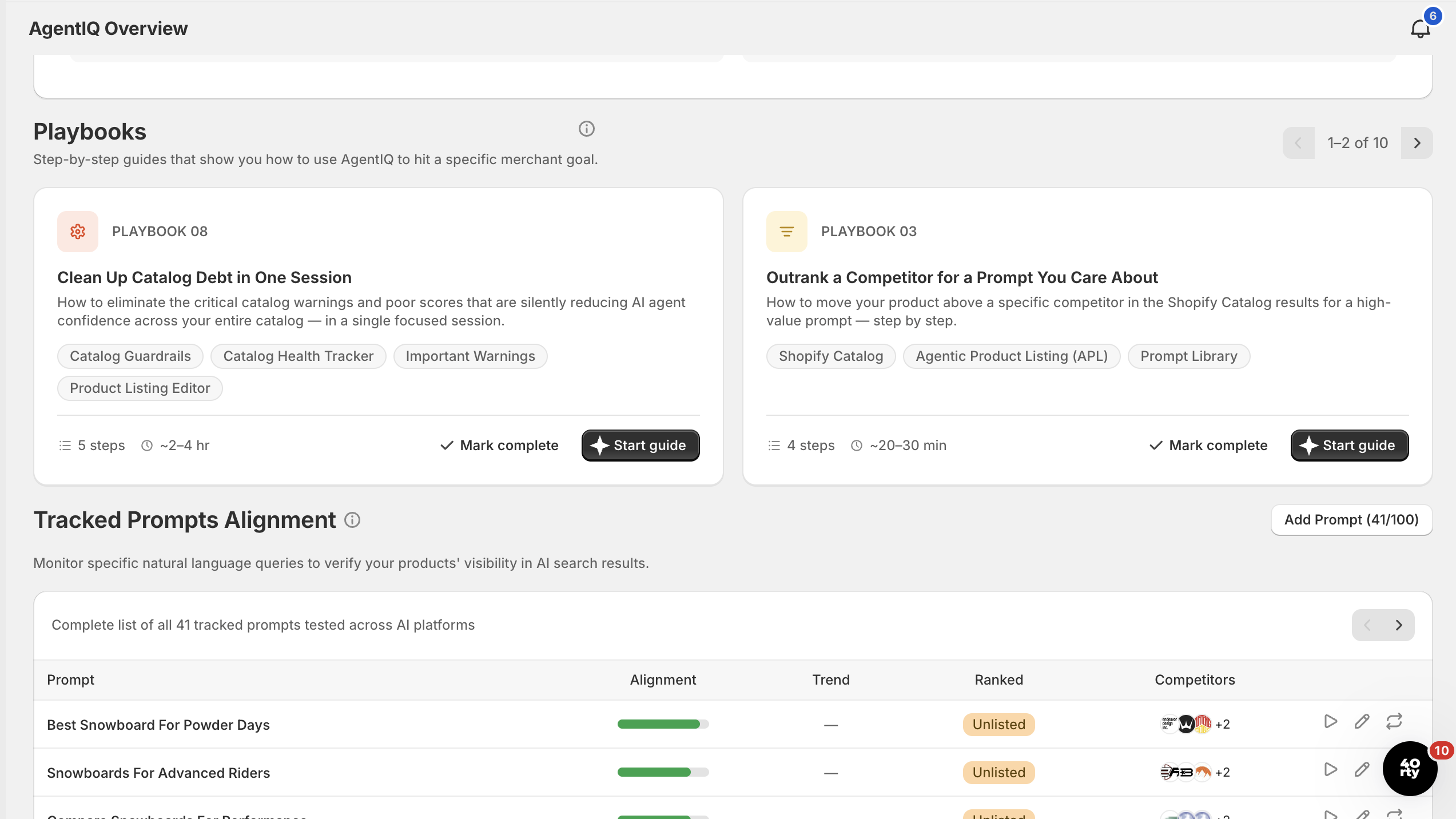
Each one names a goal, a time to complete and the features used, then walks you through the exact clicks. A few of the plays now live:
Make one product get found by AI agents
From Prompt Library to a ranked Agentic Product Listing in 30–45 minutes.
Outrank a competitor for a prompt you care about
Move above a specific competitor in the Shopify Catalog results, step by step.
Prepare for a seasonal or campaign push
Be visible for seasonal prompts before your campaign goes live, not after.
Playbooks in the AgentIQ Overview, each guide names a goal, the features it uses, a step count and a time to complete, then walks you through the exact clicks.
And that’s just the warm-up. The full set covers converting the agentic traffic you already have, launching new products agent-ready, owning a use case in your category, cleaning up catalog debt in one session and more, live now in AgentIQ. Open the app.
New
Brand Context, AgentIQ now knows who you are
AgentIQ keeps what it knows about your brand in one editable place. Brand Context compiles your Brand Identity and your Buying Personas into a single source of truth used across the platform, to create better prompts, run Operator and power other features.
It is generated automatically during onboarding, and every field is yours to edit. The more accurate it is, the closer AgentIQ gets to how your real shoppers actually talk and buy.
Brand Identity · five fields
Voice & tone, how your brand sounds. “Playful and direct. Confident, never formal.”
Core values - what you stand behind: sustainability, craftsmanship, inclusivity.
Primary audience - who they are, what they shop for, what they care about.
Primary market, the main market you sell in.
Positioning - one sentence: who you serve, what you offer and why you win.
Buying Personas: AgentIQ generates three to five during onboarding. A strong persona answers who they are, what they shop for and when, what holds them back, and how they phrase it when asking an AI agent. Refine them with real customer data, not internal guesses, and revisit quarterly.
New
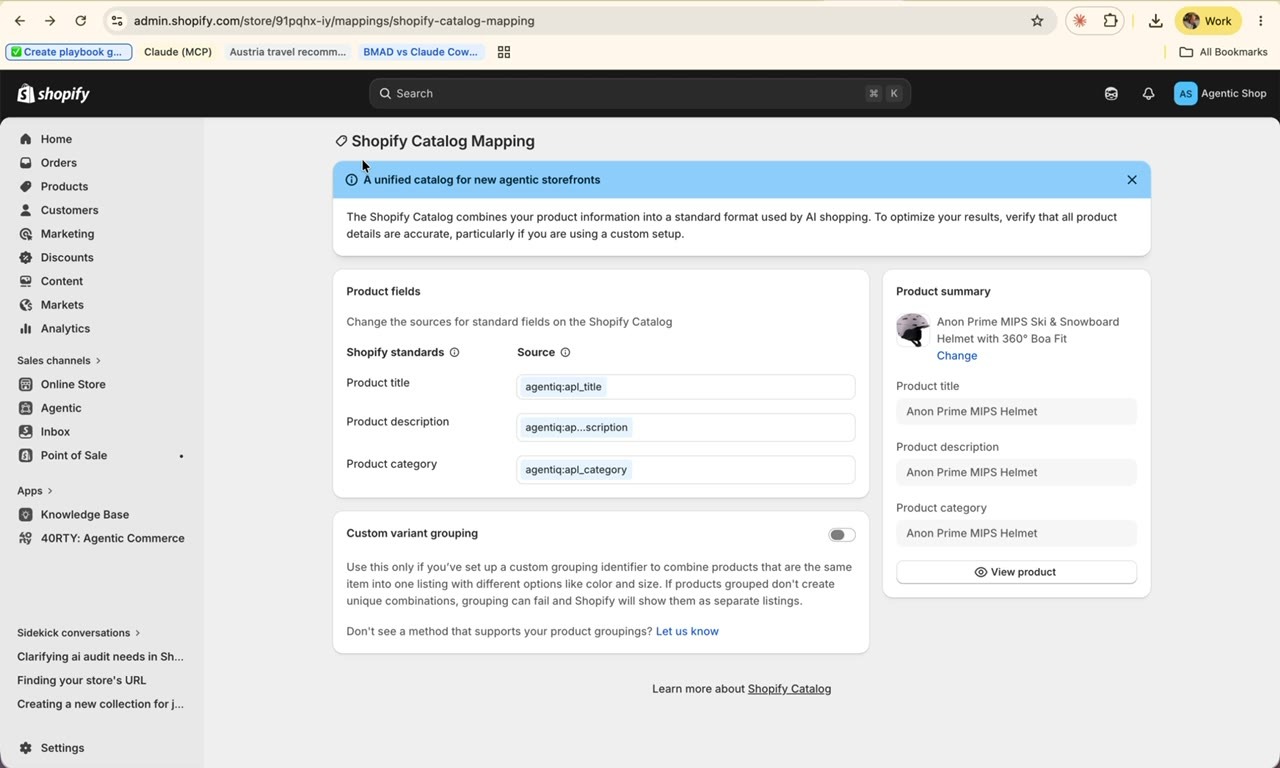
Agentic mapping, the step that makes agents see your APLs
AI agents only read your optimized listings after the AgentIQ fields are mapped into your Shopify Catalog. Without it, agents keep reading your raw catalog data.
It takes one visit to the Shopify Catalog Mapping screen in your Shopify admin, once per store, after your first APL exists:
Shopify Catalog Mapping, point each field at its AgentIQ value; the Product summary panel previews the result live.
Shopify catalog field
AgentIQ value
Product title
→
AgentIQ Title
Product description
→
Agentic description
Product category
→
AgentIQ Category
Save once and every APL you create afterwards flows through automatically. Products without an APL fall back to your default Shopify fields, so creating APLs is how you expand coverage. Work your catalog by Health score: Poor first, then Mediocre, then Excellent. Allow 24–48 hours for changes to surface in the Shopify Catalog.
Product listing suggestions, fix the page humans see, too
Creating the APL is half the work. The other half is fixing your human-facing page based on what AgentIQ learned from your competitors.
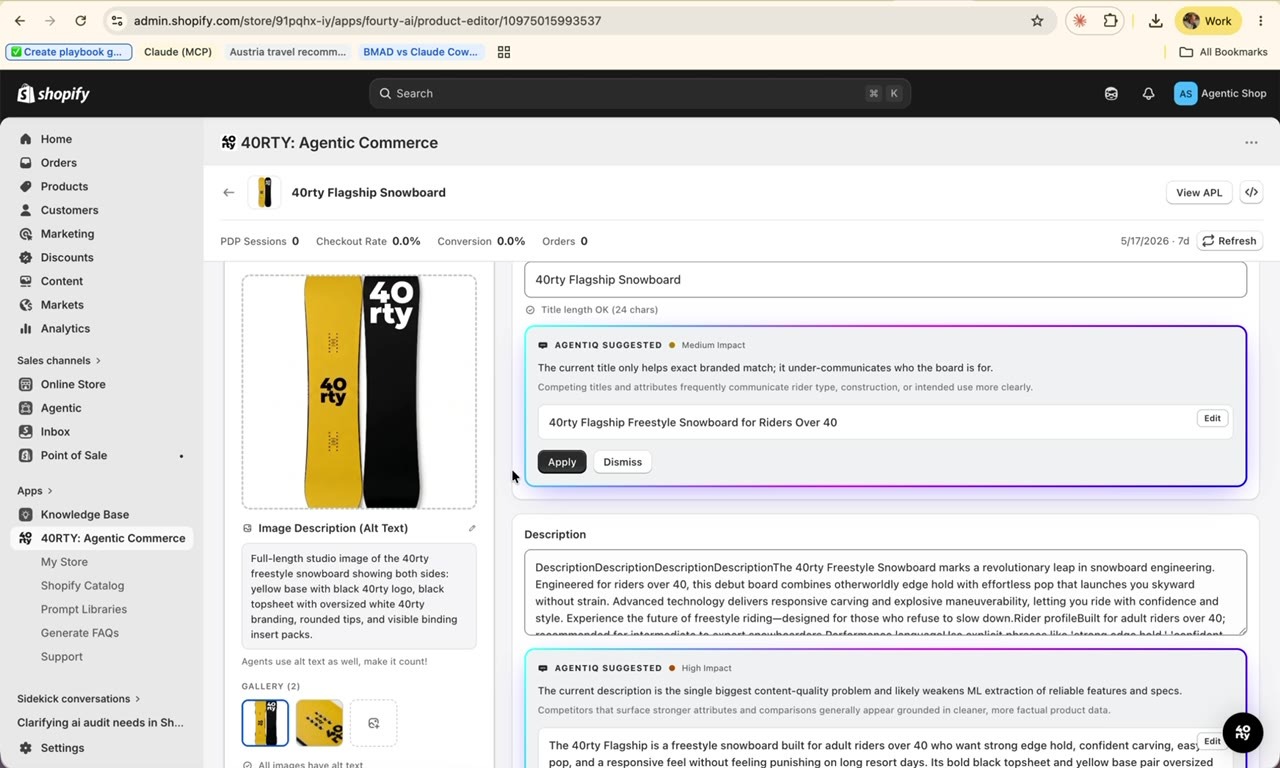
Open any product in the listing editor, via Fix Product in My Store, and the suggestions are inline: titles, descriptions, image alt text and metafields, each with an impact level (High or Medium), a one-line reason and a ready-to-apply replacement. Apply, Edit or Dismiss each one, then save to commit to Shopify.
The listing editor, each suggestion shows its impact level, why it’s suggested and a ready-to-apply replacement.
Click Optimize to run the analysis, AgentIQ scores your listing against your tracked prompts and surfaces the suggestions, so you can see at a glance which shopper queries each change helps you win. Pay particular attention to category depth, “Ski & Snowboard Goggles” performs significantly better than “Sporting Goods” for intent-driven queries. Aim for at least four taxonomy levels.
Worth knowing: unlike the APL, changes made here do affect your visible product page. Review before applying, and dismiss anything that conflicts with your brand voice or merchandising decisions you’re confident about.
New
Agentic Product Listings, written for the agent
Your Shopify product has two audiences. Human shoppers read your product page. AI agents read the Shopify Catalog.
The Agentic Product Listing (APL) is the version of your product written specifically for the second audience, stored as Shopify metafields, so you can write copy that converts humans without compromising what agents need, and vice versa. The APL never touches your human-facing page.
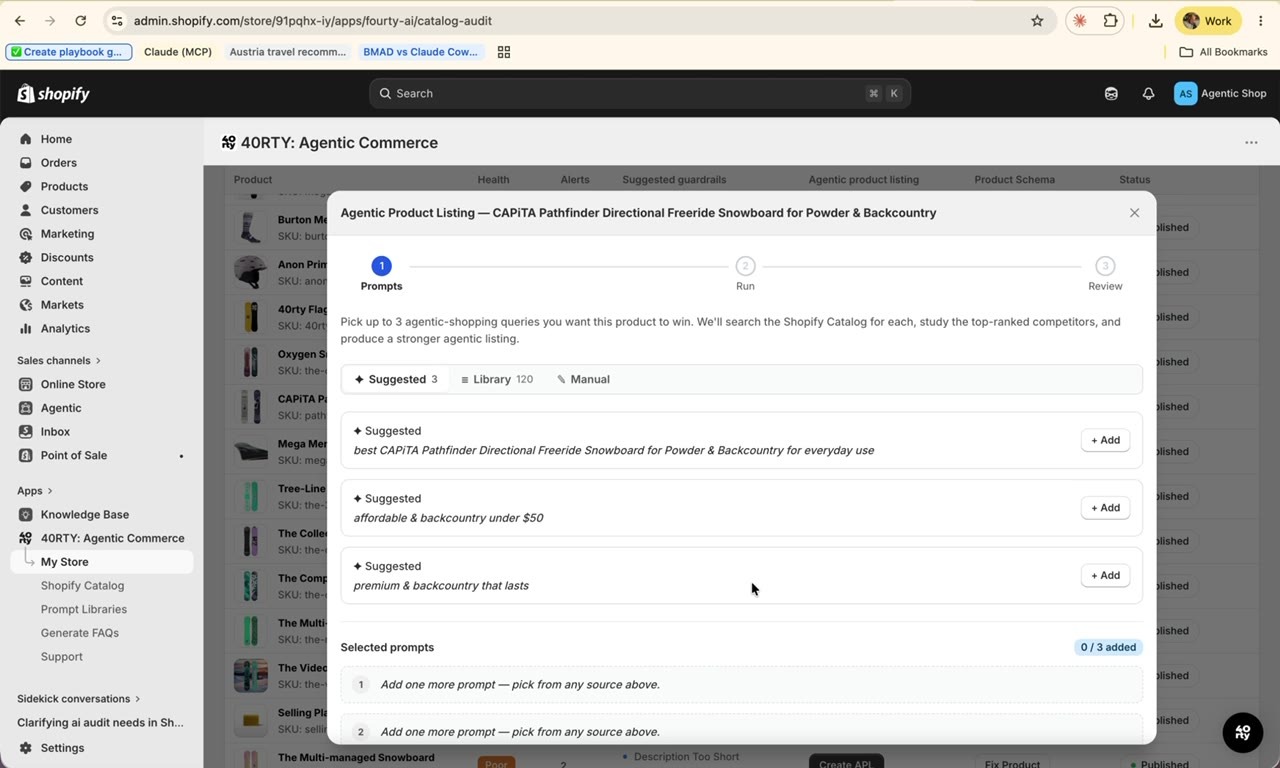
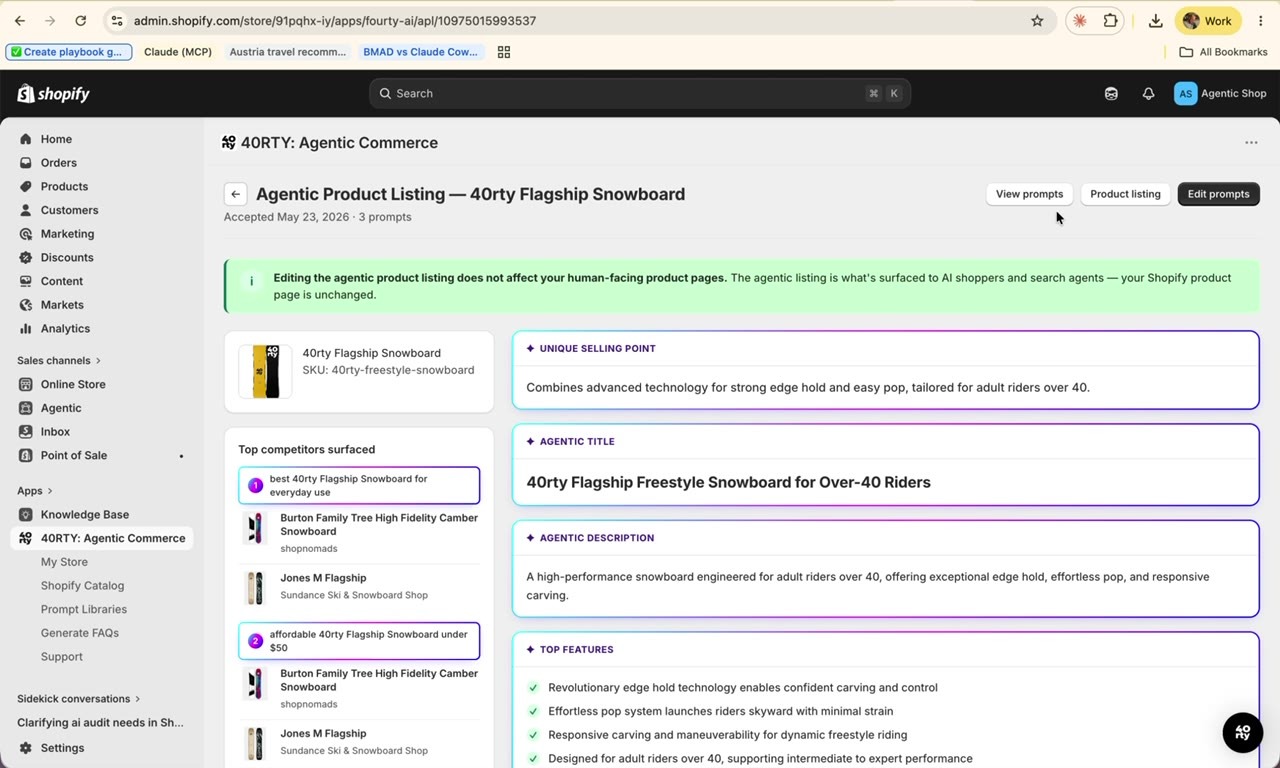
Creating one is a three-step flow from My Store: Prompts → Run → Review. Pick up to three shopper prompts - AgentIQ’s suggestions, your own Prompt Library or typed manually. AgentIQ then searches the Shopify Catalog for each prompt, studies the top-ranked competitor listings and writes your optimized version.
Step 1 - pick up to three prompts you want this product to win, from Suggested, your Prompt Library or typed manually.
1
Pick prompts
Up to three high-intent queries. Suggested, Library or manual - mix sources freely.
2
Run
AgentIQ studies the top competitors per prompt and writes the listing. Run in background if you’d rather not wait.
3
Review
Read every generated field. Check Top competitors surfaced to see exactly which listings it studied.
4
Refine
Want a different result? Rerun via Edit prompts, the APL regenerates from the prompts you pick.
The review page, every generated field, with Top competitors surfaced showing exactly which listings AgentIQ studied.
What every APL contains
Unique Selling Point, the single positioning statement an agent uses to differentiate your product.
Agentic Title, the title agents surface, distinct from your human-facing title.
Agentic Description, a structured description optimized for agent ingestion.
Top Features, the bullet points agents quote when recommending your product.
The question is not whether your next customer will use an AI agent to shop. They already are.
Agentic Product Listings, mapping, listing suggestions, Brand Context and Playbooks are live in your AgentIQ account today. Start with one product, the rest follows.